
How to Humanize an AI Apology Email So It Actually Sounds Sorry
AI apology emails sound cold and scripted. Learn how to humanize an AI apology email so it sounds sincere, takes responsibility and fixes the problem.
An apology is one of the hardest emails to write, so it's no surprise people ask AI for help. The trouble is that AI apologies often sound like a press release: "We sincerely apologize for any inconvenience this may have caused. We value your feedback and are committed to continuous improvement." Customers, colleagues and friends read that and feel even more annoyed. It sounds like nobody actually cares.
You can still use AI to get started. But an apology only works if it sounds human. This guide shows how to turn an AI draft into an apology that is sincere, specific and useful, for customers, clients, coworkers and personal situations.
Why AI apologies feel fake
AI apology drafts usually have the same problems:
- "Any inconvenience." It suggests the problem may not have been real.
- Passive voice. "Mistakes were made" instead of "I made a mistake".
- Corporate phrases. "We value your feedback", "committed to excellence", "we strive to".
- No details. The email doesn't say what actually went wrong.
- No fix. It apologizes but doesn't say what will happen next.
- Too long. Three paragraphs of regret before any useful information.
Our list of words that make text sound like AI includes many phrases that show up in apologies.
The four parts of a real apology
A good apology email does four things, usually in under 150 words:
- Says sorry clearly. "I'm sorry" or "We're sorry", not "we regret any inconvenience".
- Names the mistake. Exactly what happened.
- Takes responsibility. No excuses, no blaming others.
- Explains the fix. What you've done or will do, and by when.
Optionally, it can offer something to make it right, like a refund, a discount or extra time.
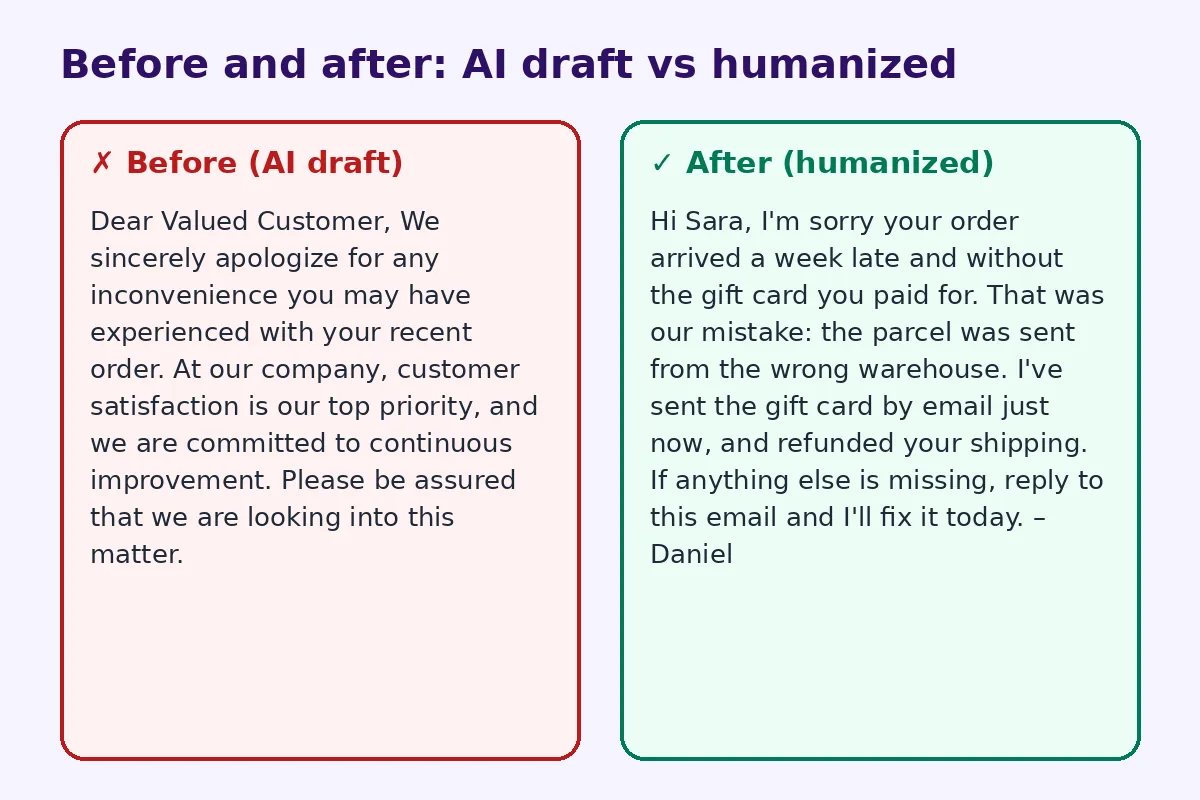
Before and after: a customer apology
Before (AI draft):
Dear Valued Customer, We sincerely apologize for any inconvenience you may have experienced with your recent order. At our company, customer satisfaction is our top priority, and we are committed to continuous improvement. Please be assured that we are looking into this matter.
After (humanized):
Hi Sara, I'm sorry your order arrived a week late and without the gift card you paid for. That was our mistake: the parcel was sent from the wrong warehouse. I've sent the gift card by email just now, and refunded your shipping. If anything else is missing, reply to this email and I'll fix it today. – Daniel
The second email is shorter, names the problem, owns it and gives a fix. It sounds like a real person.
Step 1: Give the AI the real facts
Before prompting, write down:
- What exactly went wrong
- Who was affected and how
- Why it happened, briefly
- What you've already done
- What you'll do next, and by when
- What you can offer to make it right
A prompt like "Write a short, sincere apology email to a customer whose order arrived late and missing a gift card. We sent it from the wrong warehouse. We've refunded shipping and emailed the gift card. Under 120 words. No corporate phrases." will give a much better draft.
Step 2: Remove the corporate language
Delete:
- "any inconvenience"
- "we value your feedback"
- "customer satisfaction is our top priority"
- "please be assured"
- "we strive to"
Replace them with plain words: "I'm sorry this happened", "here's what we've done".
Step 3: Use active voice
Change "an error occurred" to "we sent the wrong item". Change "your email was overlooked" to "I missed your email". Active voice shows responsibility, and readers notice.
Step 4: Skip the excuses
A brief reason is fine if it helps: "We sent it from the wrong warehouse." A long explanation sounds defensive. Keep the focus on the reader, not on why it was hard for you.
Step 5: Make the fix concrete
"We are looking into it" is not a fix. Say what you did, or what will happen and when: "Your refund will appear within three working days." If you don't know yet, say when you will update them.
Step 6: Sign it as a person
An apology from "The Customer Service Team" feels cold. Use a real name, ideally the person responsible for fixing it. Add a direct way to reply.
Apologies at work
The same rules apply to colleagues and clients.
Missed deadline: "I'm sorry, I didn't send the report on Friday as promised. I underestimated the data cleanup. You'll have it by noon tomorrow, and I've blocked my morning to make sure."
Mistake in a presentation: "The figure on slide 6 was wrong; it should be 14%, not 41%. I've sent the corrected deck. Sorry for the confusion."
Rude message: "I was short with you in yesterday's meeting, and that wasn't fair. I'm sorry. I'd like to go through your proposal properly this week."
Personal apologies
For friends and family, AI is useful only for getting started. Personal apologies need your own words even more. Mention the specific moment, how you think it made them feel, and what you'll do differently. Keep it short and avoid turning it into a long explanation of your own feelings.
Using a humanizer
If you handle many customer emails, an AI humanizer can quickly remove robotic phrasing from templates, so each reply feels less scripted. For marketing or support teams, see our guide on how to edit AI content to sound natural. Always add the specific details yourself.
Common mistakes
- Apologizing for "any inconvenience".
- Saying "sorry if you were upset" instead of "sorry I did this".
- Making excuses.
- Promising a fix without a date.
- Sending the same template to everyone.
- Waiting too long. Apologize quickly.
When to apologize by phone instead
Some situations are too serious for email alone. If a mistake cost a customer a lot of money, hurt someone, or damaged an important relationship, call first and follow up with an email that confirms what you agreed. The email then becomes a clear record: what happened, what you are doing, and when. AI can help you draft that follow-up, but the conversation itself should come from you.
Templates for teams
Support teams often keep apology templates. That is fine, as long as each template has blanks for the specific details: the customer's name, the exact problem, the fix and the date. Review templates every few months and remove phrases that sound scripted. Ask agents to add one personal sentence to each reply. Customers can tell the difference between a template that was filled in thoughtfully and one that was pasted in a hurry.
A quick checklist
- Did you say sorry clearly?
- Did you name the specific mistake?
- Did you take responsibility in active voice?
- Did you explain the fix and timing?
- Is it short?
- Is it signed by a person?
FAQ
Can I use AI to write an apology email?
Yes, as a draft. Then add the specific details, remove corporate phrases and sign it personally.
How long should an apology email be?
Usually under 150 words. Be clear and get to the fix quickly.
Should I explain why the mistake happened?
Briefly, if it helps. Avoid long explanations that sound like excuses.
What phrases should I avoid in an apology?
Avoid "any inconvenience", "mistakes were made", "we value your feedback" and "sorry if you were upset".
Should I offer compensation?
When the mistake cost the customer time or money, a refund, discount or extra service is a good way to make it right.
Try FreeHumanizerAI for free
Humanize AI text instantly. No signup, up to 5,000 words per session, and your text is not stored.
Open AI HumanizerRelated guides
- GuideHow to Humanize an AI Cold Email So People Actually ReplyAI cold emails all sound the same. How to humanize an AI cold email with real details, a short ask and a natural tone, with examples.Read
- GuideHow to Edit AI Content to Sound Natural: A Line-by-Line MethodA practical editing checklist for AI drafts, with worked examples. Fifteen minutes per article, no tricks, and the result reads like you wrote it.Read
- GuideHow to Make an AI Cover Letter Sound Human (and Actually Get Read)Turn a ChatGPT cover letter into one that sounds like you. Cut AI phrases, add real proof, fix the opening, and check the tone before you apply.Read