How to Humanize an AI Airbnb Listing So Guests Actually Book
AI Airbnb listings sound generic and get skipped. Learn how to humanize an AI Airbnb listing with honest details and a warm host voice that wins bookings.
Guests scrolling through rentals see dozens of listings that look almost identical. Since hosts started using AI, many descriptions also sound identical: "Welcome to our charming and cozy retreat, nestled in the heart of the city. This stunning space offers the perfect blend of comfort and convenience for your unforgettable stay." Guests skim straight past it. It tells them nothing they can't see in the photos, and it doesn't sound like a real person they'd trust with their trip.
AI can still save hosts time. The trick is to replace the generic phrases with honest, specific details and a host voice that feels warm and real. This guide walks through how to do that, with before-and-after examples you can copy.
Why AI rental listings fall flat
AI-written listings tend to share the same problems:
- Overused words. "Nestled", "charming", "cozy retreat", "oasis", "stunning", "unforgettable".
- No specifics. No walking times, bed sizes or real neighborhood details.
- Everything is "perfect". Perfect for couples, families, business travelers and groups, all at once.
- Hidden downsides. Stairs, street noise or a small kitchen are left out, which leads to bad reviews.
- No host personality. Guests can't tell who they're booking with.
Our list of words that make text sound like AI covers many of these phrases.
What guests actually want to know
Before writing, think about the questions guests ask before booking:
- How far is it, in minutes, from the places they care about?
- What are the beds, and how many people can sleep comfortably?
- Is there fast Wi-Fi, a proper desk, parking, air conditioning?
- Is it quiet? Are there stairs?
- How does check-in work?
- What's nearby for food, groceries and transport?
- Who is the host, and how quickly do they respond?
A humanized listing answers these clearly, in a friendly voice.
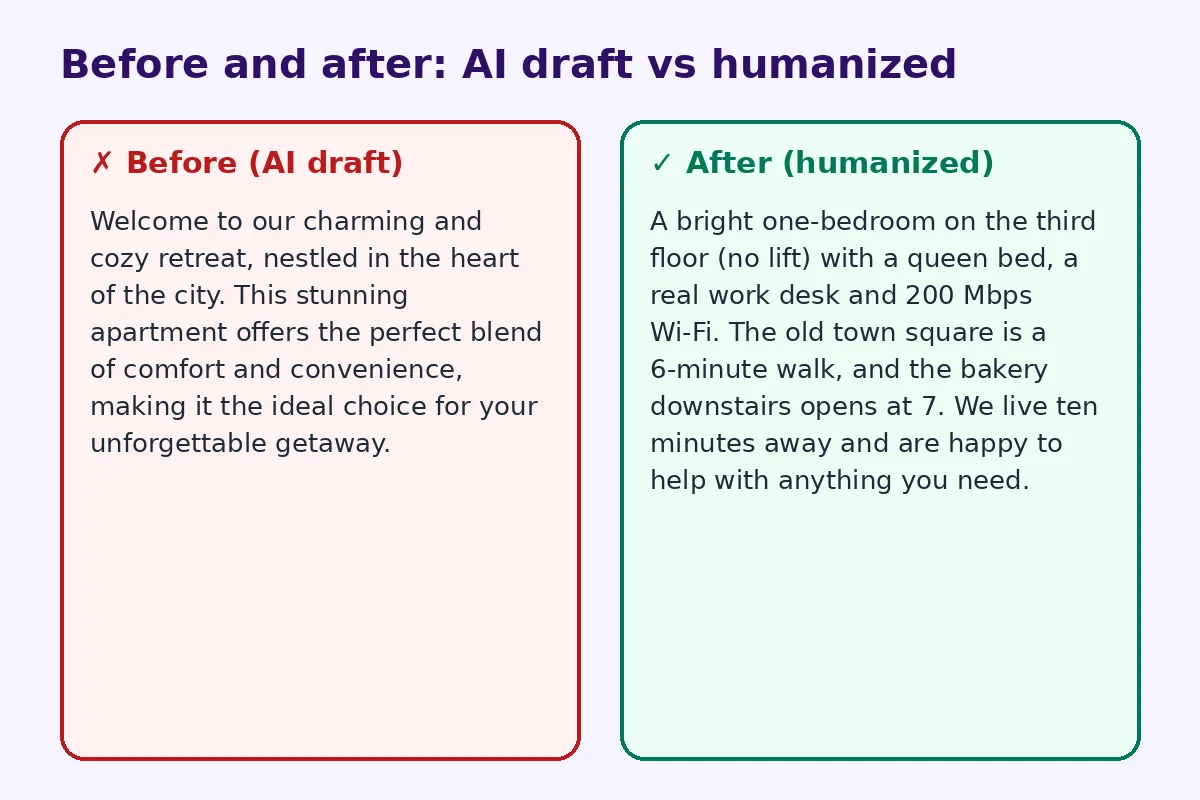
Before and after: the opening
Before (AI draft):
Welcome to our charming and cozy retreat, nestled in the heart of the city. This stunning apartment offers the perfect blend of comfort and convenience, making it the ideal choice for your unforgettable getaway.
After (humanized):
A bright one-bedroom on the third floor (no lift) with a queen bed, a real work desk and 200 Mbps Wi-Fi. The old town square is a 6-minute walk, and the bakery downstairs opens at 7. We live ten minutes away and are happy to help with anything you need.
The second version is shorter, specific, honest about the stairs and sounds like a real host.
Step 1: List the facts first
Write down, in plain notes:
- Bedrooms, bed sizes, maximum guests
- Bathrooms and what's in them
- Kitchen equipment
- Wi-Fi speed and workspace
- Parking, lift, stairs, accessibility
- Walking or driving times to key places
- Check-in method and times
- House rules
- Honest downsides
Give these notes to AI if you want a draft, but keep the facts exactly as they are.
Step 2: Lead with your best real feature
Your first two lines matter most, because they appear in search previews. Put your strongest, most specific selling point first: "Sea view from the bed", "Free parking in the city center", "5 minutes from the main train station."
Step 3: Replace adjectives with details
Instead of "cozy", say "a small, warm living room with a sofa bed and a reading lamp." Instead of "stunning views", say "you can see the mountains from the balcony on clear mornings." Details are more convincing than adjectives.
Step 4: Be honest about the downsides
Mention stairs, street noise, a compact bathroom or a shared entrance. Guests who know in advance won't complain later, and honesty builds trust. You can frame it kindly: "It's a lively street, so we've added earplugs and thick curtains."
Step 5: Write in a warm host voice
Use "we" or "I" and "you". Share a little about yourself and why you love the area. Recommend your favorite café or a walk you enjoy. Guests want a sense of who they're staying with. Our guide on how to humanize an AI bio can help with the "About the host" section.
Step 6: Make it easy to scan
Break the description into short sections:
- The space
- Sleeping arrangements
- Kitchen and work setup
- Getting here and parking
- The neighborhood
- Check-in
- Good to know
Short paragraphs and bullet points work better on phones.
Step 7: Keep house rules friendly
AI often writes rules in a stiff way: "Guests are strictly prohibited from..." Try a friendlier tone: "Please keep music low after 10 pm. Our neighbors are lovely and we'd like to keep it that way."
The guidebook and house manual
Once guests book, they need practical information: Wi-Fi, appliance instructions, checkout steps, local tips. Many hosts now put a QR code on a welcome card or fridge magnet that opens a digital house manual, so guests can find everything on their phone. Our sister site has a practical guide to QR codes for Airbnb hosts that explains how to set up Wi-Fi, guidebook and review codes in your rental.
Write that guidebook in the same warm, specific voice as your listing.
Using AI and humanizers wisely
AI is useful for structuring a listing, translating it for international guests, and suggesting section headings. Give it your real details and ask for a warm, plain-English description with no clichés. Then edit it yourself. If you manage many listings, an AI humanizer or our marketing copy humanizer can quickly remove robotic phrasing, but always check facts like bed sizes and distances.
Listing titles
Titles have a short character limit, so focus on the top selling point and location: "Sea-view studio, 2 min to beach, free parking" beats "Charming cozy retreat by the sea."
Update your listing with guest feedback
Your reviews are a free source of better listing copy. Read them and note what guests mention again and again: the quiet bedroom, the helpful host, the great breakfast spot nearby. Those are your real selling points, and they belong in the first lines of your description. Also look for repeated questions or small complaints. If several guests mention that the shower takes a minute to warm up, add a friendly note to the listing and the house manual. Each update makes the listing more accurate, and accurate listings get better reviews.
Common mistakes
- Opening with clichés.
- Claiming the place suits every type of guest.
- Hiding stairs, noise or small spaces.
- Long blocks of text with no sections.
- Copying the same description across several properties.
- Forgetting to update the listing after changes.
FAQ
Can I use AI to write my Airbnb listing?
Yes. Give it accurate details, then edit the draft so it sounds like you and is honest about the space.
How long should an Airbnb description be?
Long enough to answer key questions, usually several short sections. Put the most important points first.
What words should I avoid in a rental listing?
Overused words like "nestled", "charming", "oasis", "stunning" and "unforgettable".
Should I mention downsides in my listing?
Yes. Being honest about stairs, noise or space prevents bad reviews.
How do I make my listing stand out?
Lead with a specific, real feature, use clear details and write in a warm host voice.
Try FreeHumanizerAI for free
Humanize AI text instantly. No signup, up to 5,000 words per session, and your text is not stored.
Open AI HumanizerRelated guides
- GuideHow to Humanize an AI Real Estate Listing So Buyers Actually Book a ViewingAI property listings all sound the same. Learn how to humanize AI real estate listing descriptions with real details and a natural tone. Examples inside.Read
- GuideHow to Humanize AI Product Descriptions So They Actually SellAI product descriptions sound generic and hurt sales. Learn how to humanize them with real details, buyer language and a clear voice, with examples.Read
- GuideHow to Edit AI Content to Sound Natural: A Line-by-Line MethodA practical editing checklist for AI drafts, with worked examples. Fifteen minutes per article, no tricks, and the result reads like you wrote it.Read